Satellites and Constellation 3D Icons: Choosing the Right Visual Tools for Space-Themed Projects
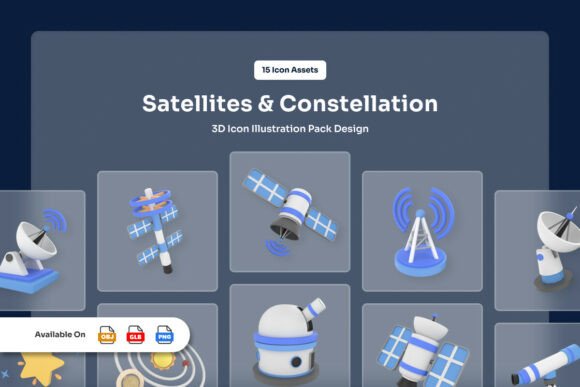
When working on space-related projects—whether for educational platforms, tech presentations, or UI design—having the right visual assets makes all the difference. The Satellites and Constellation 3D Icons pack offers a clean, semi-realistic visual language inspired by orbital mechanics and celestial mapping. Designed for clarity and professionalism, this set helps translate complex space concepts into accessible graphics that enhance user engagement and comprehension.
Common Mistakes When Selecting and Using 3D Icon Sets
Many creators jump into downloading or purchasing 3D icon sets without fully considering their long-term usability or compatibility with their project goals. This oversight can lead to wasted time, increased costs, and a final product that doesn’t meet expectations.
Mistake 1: Not Checking File Compatibility
One of the most common issues users face is assuming all 3D icon sets work seamlessly with their preferred software. The Satellites and Constellation 3D Icons pack includes multiple file types—Blender (.blend), OBJ, GLB, and high-resolution PNGs—giving users flexibility. However, if your workflow doesn’t support these formats, you may end up spending time converting files or searching for workarounds.
Better approach: Before downloading, verify which file types your tools support. If you're using a game engine or 3D modeling software, confirm compatibility with OBJ or GLB files. For UI or web design, PNGs at 3000 x 3000 px with transparent backgrounds are ideal for integration into design tools like Figma or Photoshop.
Mistake 2: Overlooking Editability
Some users assume that because a 3D icon looks good out of the box, it can be easily customized. The Satellites and Constellation 3D Icons offer full color editability in Blender, but not all users are familiar with 3D editing tools.
Better approach: If you need to adjust colors or textures, ensure you have access to Blender or someone on your team who can make those edits. Otherwise, stick with the provided PNGs or use the GLB/OBJ files in compatible 3D viewers or engines that allow basic material changes.
Mistake 3: Ignoring Asset Organization
A disorganized asset pack can slow down your workflow significantly. Fortunately, this icon set is delivered with well-organized layers, making it easier to isolate parts of a model or icon for use in different contexts.
Better approach: Take a few minutes to explore the layer structure of the Blender file. Understanding how each part of a satellite or constellation icon is grouped can save hours when repurposing visuals for different slides, app screens, or illustrations.
How These Mistakes Affect Your Work
Ignoring file compatibility or editability can result in icons that don’t match your brand colors or integrate poorly into your interface. Misusing assets due to poor organization can lead to inconsistent visuals, which undermine professionalism and clarity—especially in educational or technical contexts.
For example, a science educator using these icons in a presentation may find that the default colors clash with their slide theme. If they can’t edit the Blender file, they’re stuck with mismatched visuals that distract from the content rather than enhance it.
What to Check Before Using Satellites and Constellation 3D Icons
To ensure a smooth experience with this icon pack, review the following points before use:
- File formats: Confirm you have the tools to open .blend, OBJ, GLB, or PNG files.
- Editability: Check if you or your team can modify Blender files or if you’ll need to rely on static PNGs.
- Resolution and transparency: Make sure the 3000 x 3000 px PNGs suit your project’s quality and background needs.
- Asset variety: Review the 15 included icons to ensure they cover your use cases—whether for satellite systems, orbital paths, or constellation mapping.
Practical Tips for Getting the Most from This Icon Set
Here are a few ways to make the most of the Satellites and Constellation 3D Icons without running into common pitfalls:
- Start with the PNGs: If you’re unsure about 3D editing, begin with the high-res PNGs. They’re ready to use and perfect for web, print, or UI design.
- Use GLB files for interactive projects: If you’re building a web-based 3D viewer or interactive app, GLB files offer a compact, embeddable format that loads efficiently.
- Test in your environment: Before finalizing your design, test the icons in your actual project environment—whether it’s a slide deck, website, or mobile app—to ensure clarity and performance.
Choosing the Right Icons for Your Project
Not all 3D icon sets are created equal. The Satellites and Constellation 3D Icons stand out due to their clean, semi-realistic style and attention to technical accuracy. Whether you're building a STEM learning module or designing a satellite monitoring dashboard, these icons offer a professional edge without overwhelming the viewer.
However, avoid the temptation to use all 15 icons just because they’re available. Choose only the ones that clearly support your message or interface. Overloading a design with unnecessary icons can confuse users and dilute your visual impact.
Final Thoughts
The Satellites and Constellation 3D Icons pack is a powerful tool for creators working in space-related fields. With a thoughtful approach to file formats, customization, and organization, you can avoid common mistakes and ensure your visuals enhance rather than hinder your project. Always test your icons in context, verify compatibility, and prioritize clarity to make the most of this production-ready set.