3D Paper Pot of Gold or Cauldron Box SVG: A Practical Guide to Flawless Assembly
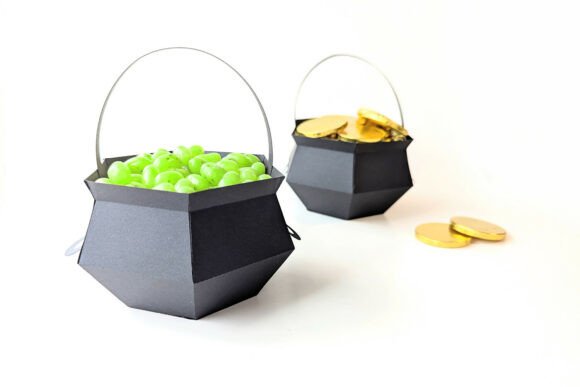
Creating a three-dimensional paper craft that looks professional requires more than just a sharp blade and some cardstock. The 3D Paper Pot of Gold or Cauldron Box SVG is a versatile design template perfect for celebrating Halloween with a spooky cauldron or St. Patrick's Day with a gleaming pot of gold. While the concept is simple—a flat file transformed into a 3D object—the execution often trips up even experienced crafters. This instant download is designed for desktop plotting machines like the Cricut Explore or Silhouette, yet many users overlook critical details that lead to frustration, wasted materials, and poor structural integrity.
Understanding the Design and Its Versatility
This specific digital product is not merely an image; it is a precise engineering blueprint for paper crafting. When you download the 3D Paper Pot of Gold or Cauldron Box SVG, you are acquiring a set of vector files intended to be cut from heavy cardstock or paper. The design includes all necessary tabs, slots, and fold lines required to assemble a sturdy box. It is particularly valuable for small business owners selling party favors, educators creating classroom decorations, or hobbyists looking for high-quality DIY projects.
The beauty of this design lies in its adaptability. Whether you are using a vinyl cutter, a laser engraver, or simply scissors and a craft knife, the underlying geometry remains consistent. However, the medium matters significantly. Using thin printer paper will result in a flimsy structure that collapses under its own weight, while overly thick chipboard might prevent the intricate tabs from fitting into their slots. Understanding the material requirements before you begin is the first step toward a successful project.
Common Pitfalls in File Preparation and Software Usage
One of the most frequent mistakes involves how the files are opened and resized. Many users assume that any graphics software will handle the 3D Paper Pot of Gold or Cauldron Box SVG perfectly. While free tools like Inkscape or Photopea are excellent for opening and editing these files, improper scaling can ruin the assembly process. If you resize the cutting template without maintaining the aspect ratio, the tabs will no longer align with the slots. This seemingly minor error renders the entire project unusable.
Always scale all pieces equally and proportionally. Before sending your design to the cutting machine, double-check the dimensions in your software. If you need a larger pot, increase the size percentage uniformly across the entire canvas. Do not stretch the width or height independently. Additionally, ensure that the file format matches your workflow. The package typically includes:
- SVG: The primary format for Cricut Design Space, Silhouette Studio, Brother ScanNCut, and other modern cutting machines. This is the fully editable vector file you should use for cutting.
- DXF: Ideal for older machines or CAD-based software like AutoCAD and Graphtec.
- EPS: Best used if you plan to manipulate the vectors in professional editing software like Adobe Illustrator.
- PNG: A non-cuttable reference image. Use this only for visualizing the final look or printing color guides; do not attempt to cut from this file as it lacks the necessary vector paths.
The Critical Importance of Scoring and Folding
A major oversight among beginners, particularly those using Cricut machines, is neglecting the scoring process. Cutting the shape is only half the battle; folding the paper cleanly is what gives the 3D Paper Pot of Gold or Cauldron Box SVG its professional finish. Without proper scoring, the paper will tear along the fold lines, creating jagged edges that compromise the aesthetic appeal and structural stability of the box.
If you are using a Cricut Explore or Maker, you must equip your machine with a separate scoring tool, such as a scoring stylus or a scoring wheel. The standard fine-point blade cannot create the necessary crease. Similarly, Silhouette users should utilize the rotary blade or a dedicated scoring tool within their software settings. For those cutting by hand, use a bone folder and a ruler to press down firmly on the fold lines before bending. Skipping this step results in a box that looks homemade in a negative way, rather than crafted with precision.
Material Selection and Color Considerations
The choice of paper stock directly impacts the usability and presentation of your final product. A common misunderstanding is assuming that the colors in the PNG preview can be changed digitally within the cutting software. Remember, the PNG is a static image for reference only. To change the colors, you must select different colored cardstocks or print the design yourself using a high-quality printer.
For the best results, choose cardstock between 65 lb and 110 lb. Anything lighter will lack the rigidity needed for a 3D structure, especially if you plan to fill the pot with candy or coins. Heavier stock may require a slower cutting speed and multiple passes to ensure a clean cut. Furthermore, consider the theme. For Halloween, black, orange, or metallic purple cardstocks work well for the cauldron. For St. Patrick's Day, vibrant greens and golds bring the pot of gold to life. Testing your machine settings on a scrap piece of your chosen material before cutting the final design is a crucial step that saves time and resources.
Assembly and Learning Resources
Even with perfect cuts and scores, assembly can be daunting without guidance. The instructions included in the download provide the foundational steps, but visual learners often benefit from seeing the process in action. The product ZIP folder contains a link to a tutorial video demonstrating exactly how to assemble the product. Watching this video before you begin gluing or taping can prevent misaligned seams and uneven sides.
When assembling, take your time. Apply adhesive sparingly to the tabs to avoid warping the paper. Start by connecting the side panels to form the cylinder or base, then attach the bottom and lid components last. If a tab does not fit easily, do not force it. Re-examine your cut and score lines. Often, a slightly deeper score or a tiny trim with scissors is all that is needed to make the pieces snap together seamlessly.
Evaluating Your Investment and Workflow
Before purchasing or downloading the 3D Paper Pot of Gold or Cauldron Box SVG, evaluate your current setup. Do you have the necessary software installed? Is your cutting machine calibrated correctly? Do you have access to the appropriate scoring tools? Answering these questions beforehand ensures a smooth workflow. This design is an investment in your creativity, but it requires the right preparation to yield high-quality results.
By avoiding the common traps of improper scaling, neglecting scoring, and choosing the wrong materials, you transform a simple digital file into a tangible, impressive craft. Whether you are a marketer creating branded giveaways, a teacher making holiday props, or a hobbyist decorating your home, attention to detail is the key to success. With the right approach, this versatile SVG design becomes a reliable tool for creating memorable, high-quality paper crafts year after year.